How to set up Vagaro
with CRM Connector
This guide explains how to connect Vagaro with CRM Connector using Vagaro's API and webhooks. Follow the steps below to configure the integration correctly.
Important Disclaimer
Before setting up the integration, please note:
- Vagaro API usage may incur costs.
- Vagaro includes 5,000 free API calls per month.
- Any usage above 5,000 API calls per month will be billed by Vagaro, not CRM Connector.
CRM Connector is not responsible for any charges billed by Vagaro. All API billing and pricing are controlled entirely by Vagaro.
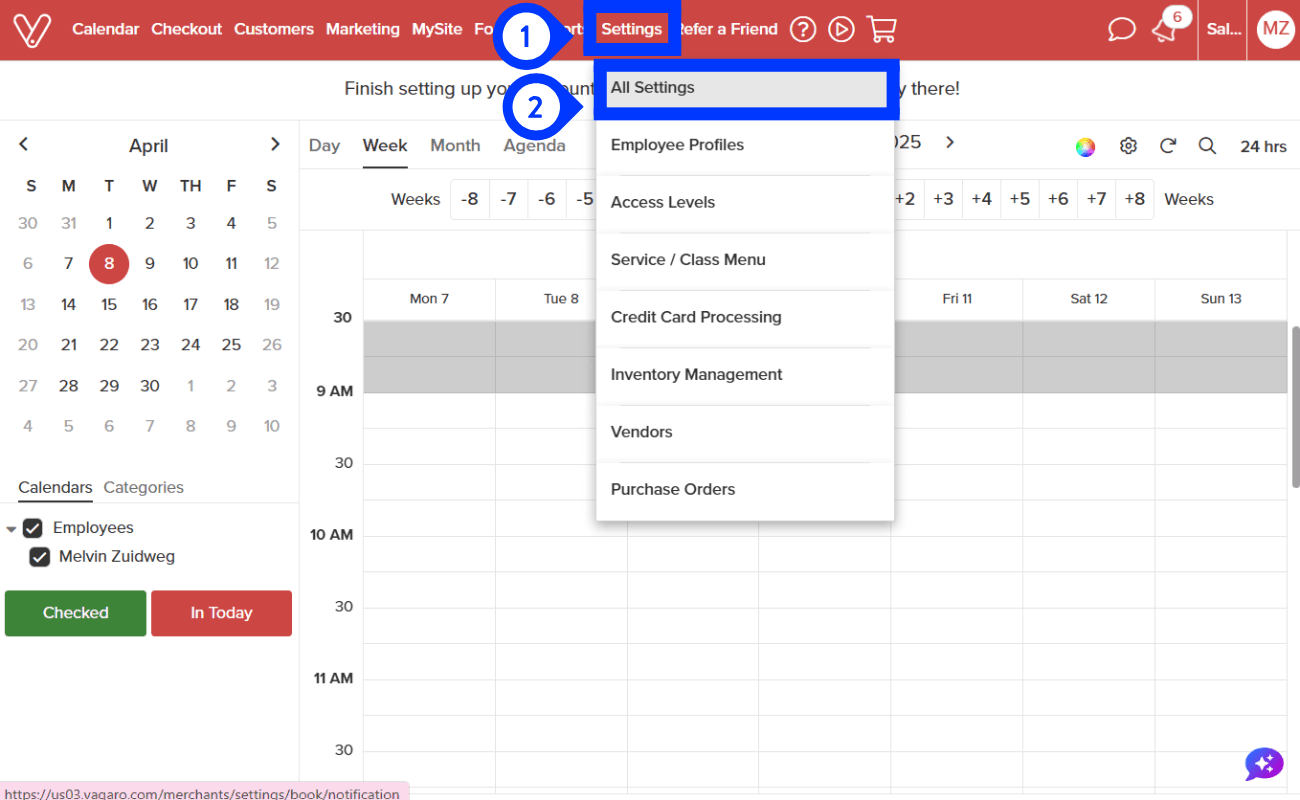
Step 1 of 9
Go to Settings
Step 1: Click "Settings" within your Vagaro account.
Step 2: Click "All Settings".
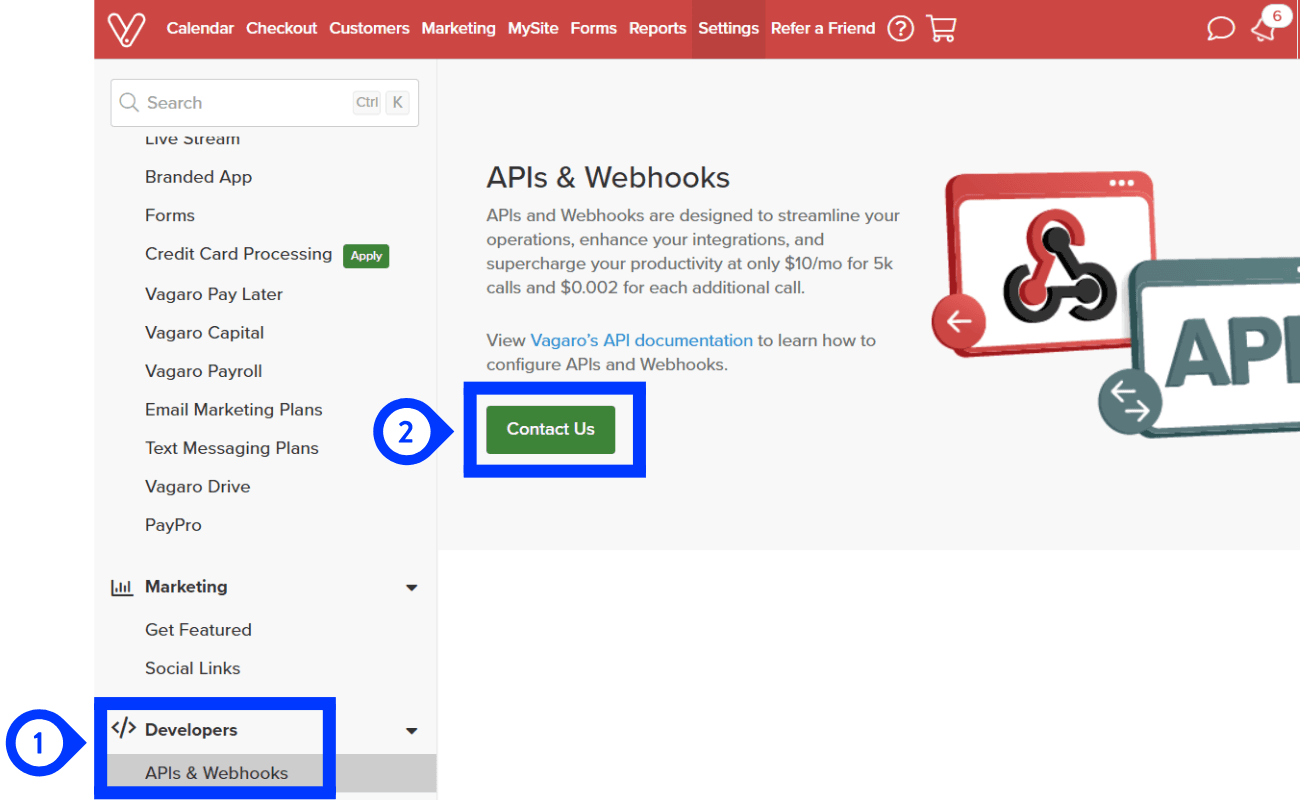
Step 2 of 9
Go to Developers
Step 1: Scroll down to "Developers" and click "APIs & Webhooks".
Step 2: Click "Contact Us".
You'll need to click "Contact Us" and fill out the form before gaining access to "APIs & Webhooks".
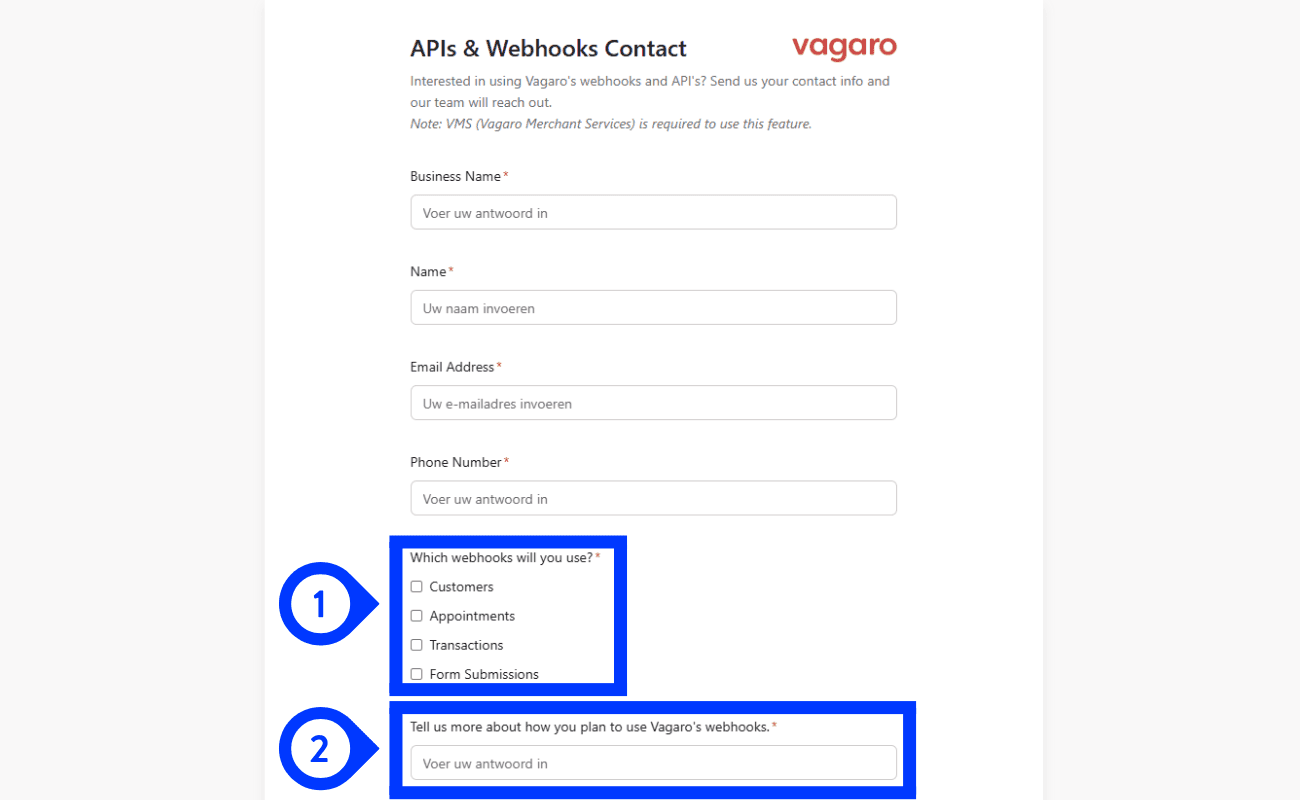
Step 3 of 9
Complete the form
Step 1: At "Which webhooks will you use?" please select "Appointments & Customers".
Step 2: In the field "Tell us more about how you plan to use Vagaro's webhooks", please copy and paste the following sentence:
Paste this text
We aim to use created appointment events and Customers events to filter out active clients in our system.Approval may take up to 5 business days.
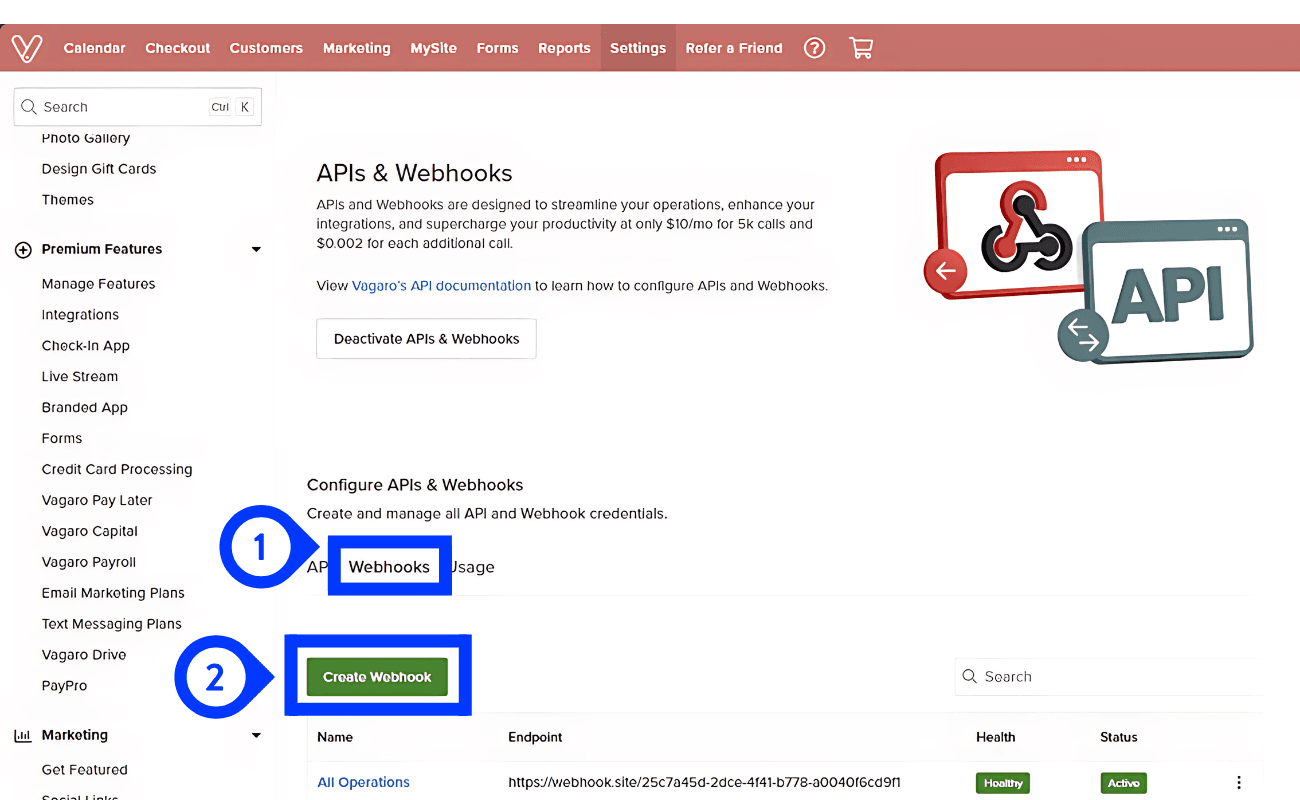
Step 4 of 9
Create the Webhook Customer
Step 1: Navigate back to "APIs & Webhooks" and click on "Webhooks".
Step 2: Click the "Create Webhook" button.
Step 5 of 9
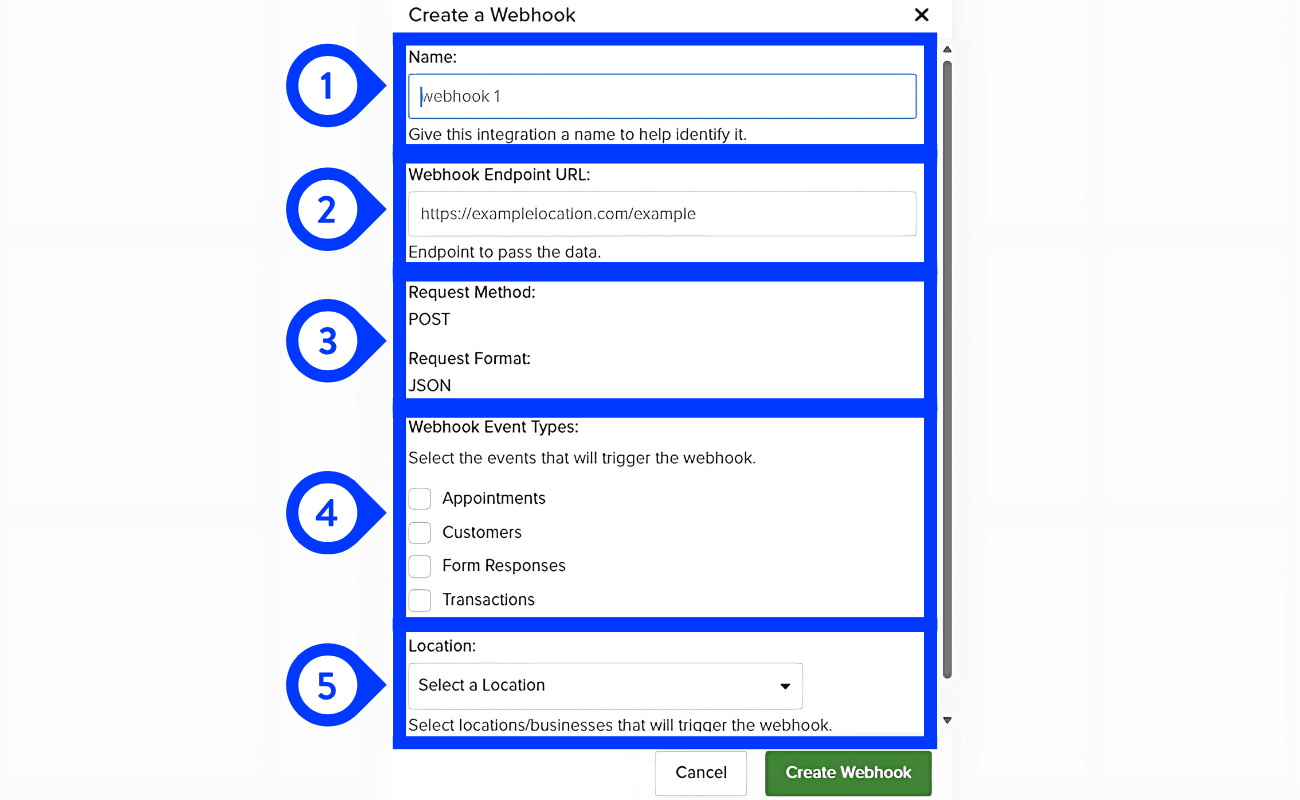
Creating the Webhook Customer
Step 1: Enter any name you like in the Name field. Make sure it's something you'll easily recognize later.
Step 2: Copy and paste the following webhook URL:
Step 3: Set the Request Method to POST and the Request Format to JSON.
Step 4: Select "Customer" as the trigger event.
Step 5: Choose the location(s) you want to connect to this webhook.
Webhook URL
https://api.crm-connector.com/vagaro/customer-webhook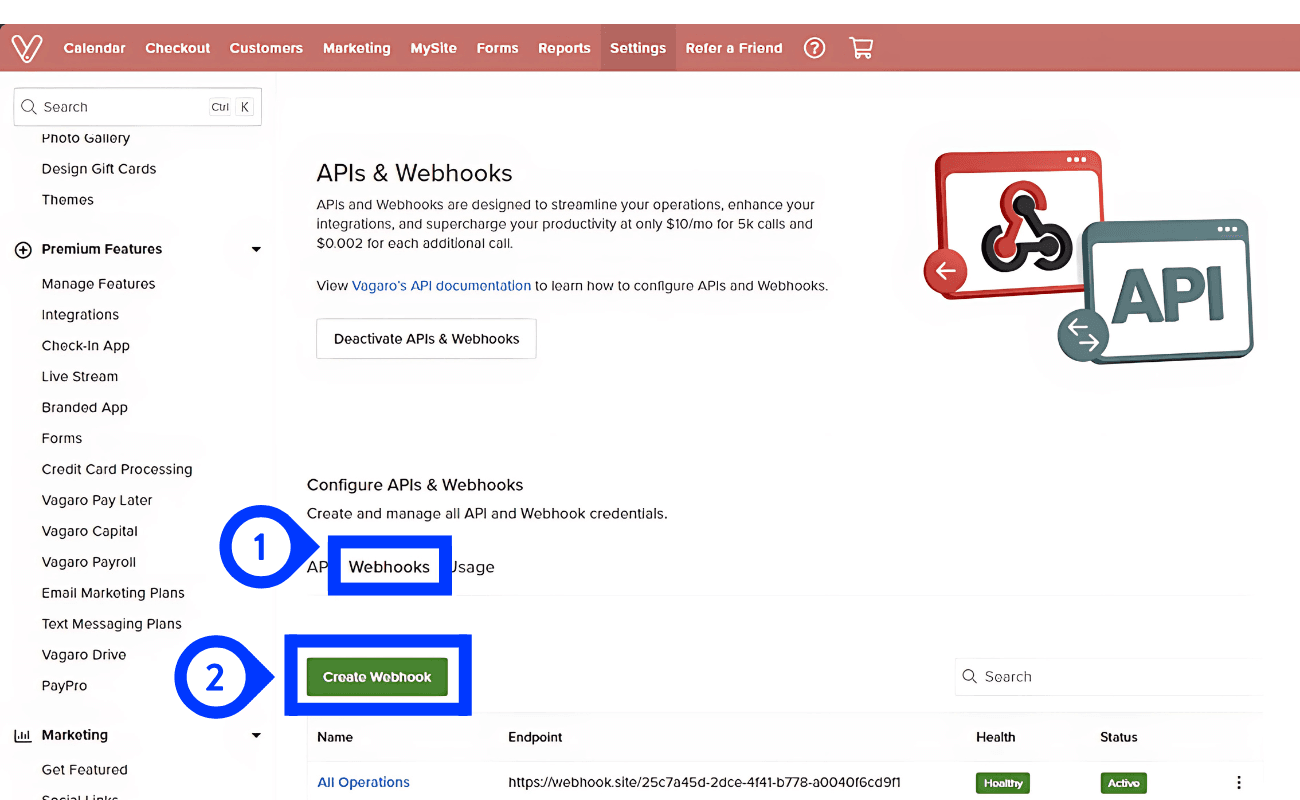
Step 6 of 9
Required for customer syncCreate the Webhook Appointment
Step 1: Navigate back to "APIs & Webhooks" and click on "Webhooks".
Step 2: Click the "Create Webhook" button.
Set this webhook up if you want contacts to be qualified as customers. The customer webhook on its own only creates leads. Completed paid and consultation appointments are what promote a contact to a customer.
Step 7 of 9
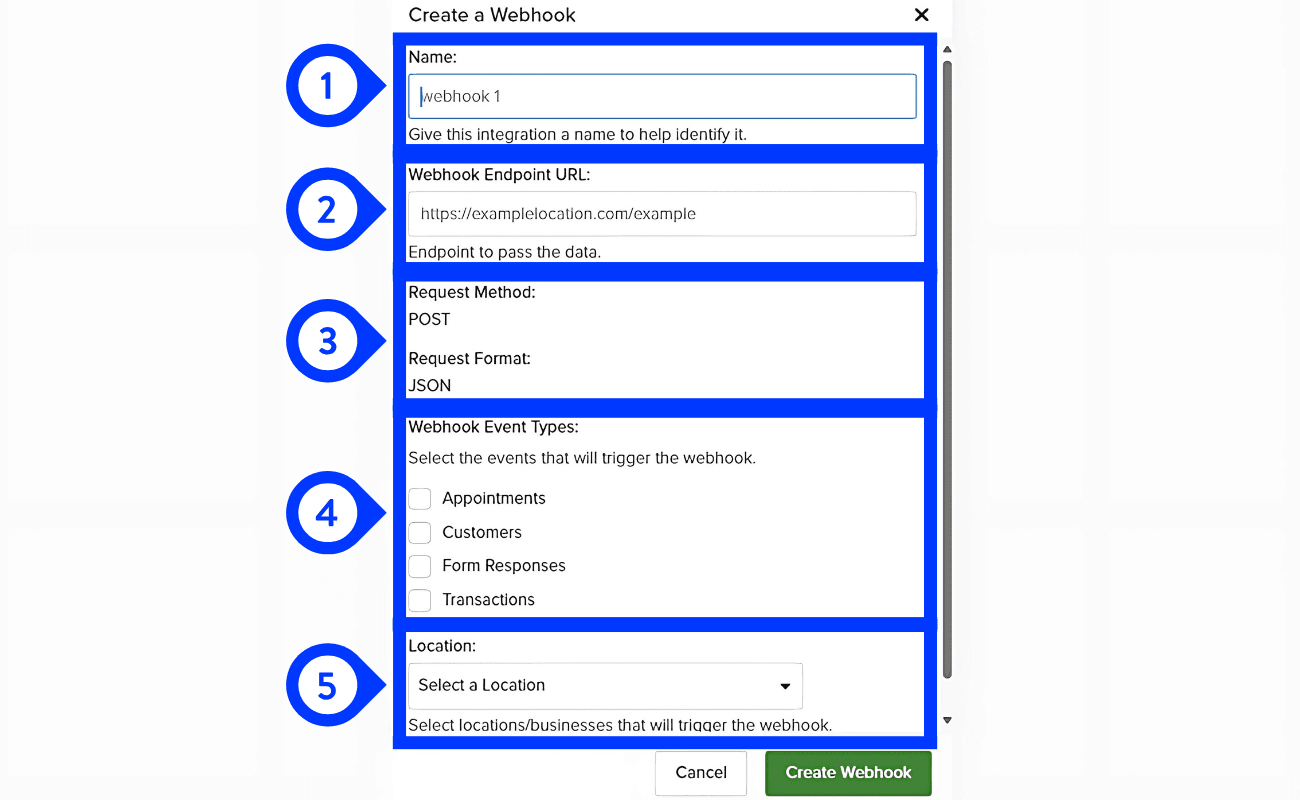
Required for customer syncCreating the Webhook Appointment
Step 1: Enter any name you like in the Name field. Make sure it's something you'll easily recognize later.
Step 2: Copy and paste the following webhook URL:
Step 3: Set the Request Method to POST and the Request Format to JSON.
Step 4: Select "Appointment" as the trigger event.
Step 5: Choose the location(s) you want to connect to this webhook.
Webhook URL
https://api.crm-connector.com/vagaro/appointment-webhook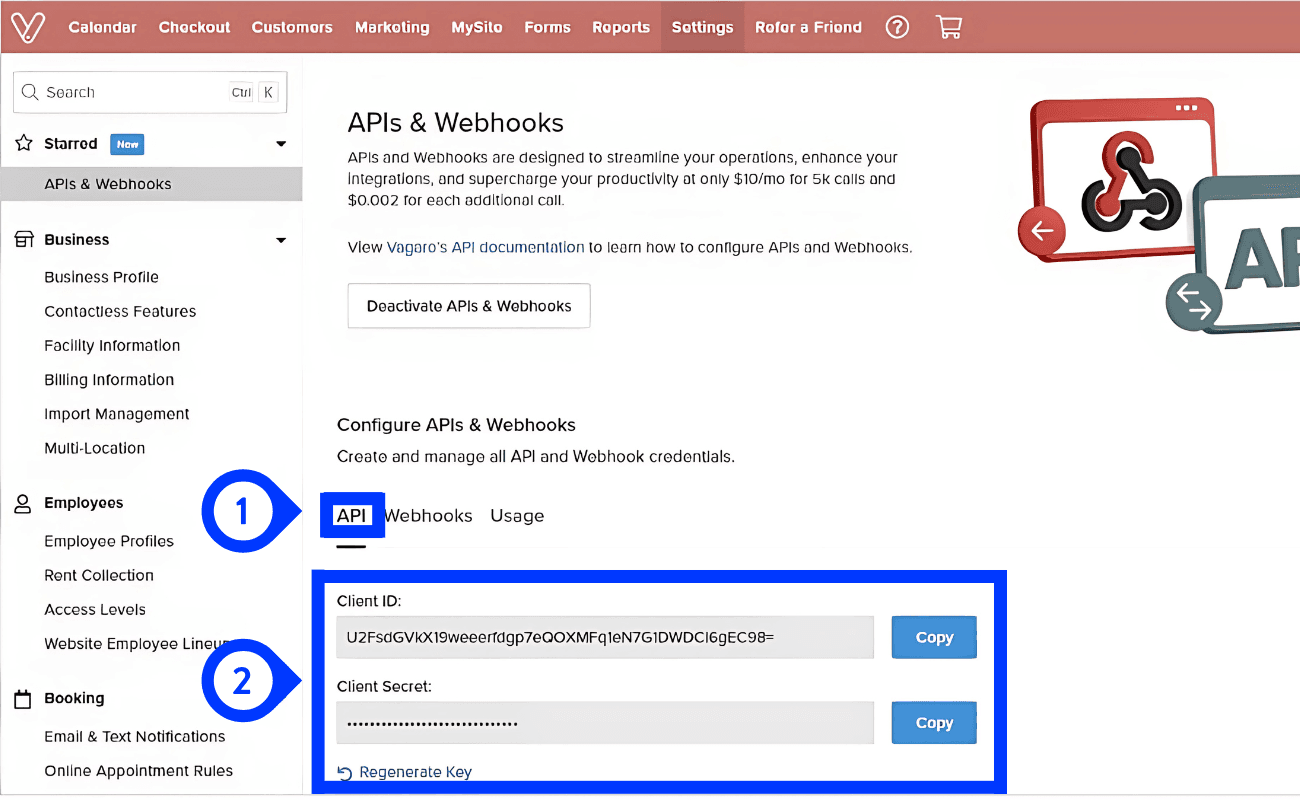
Step 8 of 9
Getting the Client ID and Client Secret
Step 1: Navigate back to "APIs & Webhooks" and click on "API".
Step 2: Copy your Client ID and Client Secret.
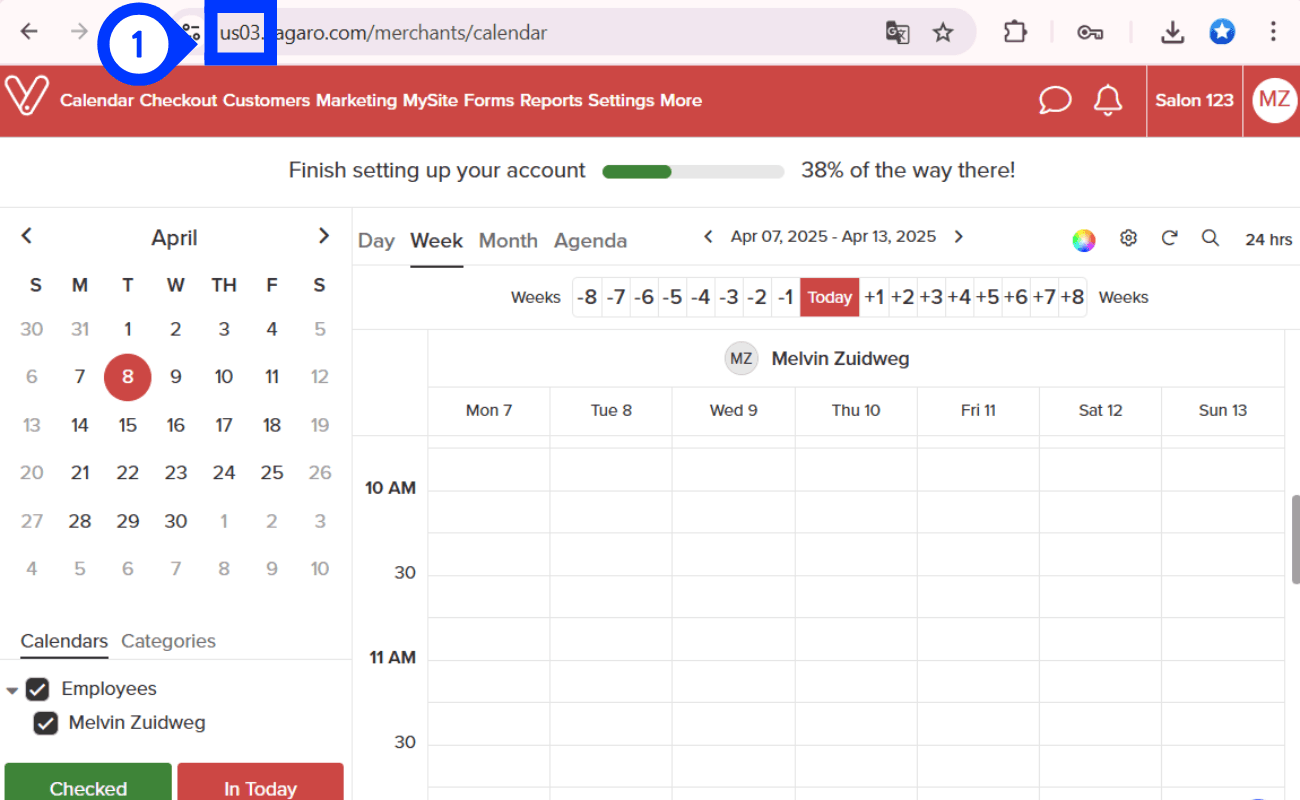
Step 9 of 9
Getting the right Region
Step 1: In the URL bar, you'll see the website address. At the beginning of the URL, your region will be indicated. Copy and paste this region exactly as shown (e.g., "usa03"), without any dots or extra characters.
How the integration works
Important details about the Vagaro integration, including sync behavior, API usage, and webhook requirements.
Unlike most other integrations supported by CRM Connector, Vagaro works through webhooks and API requests. Because of this:
- Vagaro does not allow a full historical data import through our integration.
- The integration starts syncing from the moment the webhook is activated.
- Historical appointment data cannot be automatically imported.
This is a limitation of the Vagaro API, not CRM Connector.
Vagaro is not on a sync schedule. Every update is driven by the webhook itself:
- A customer webhook creates or updates the contact in GoHighLevel as a lead, straight away.
- An appointment webhook for a completed appointment promotes that contact to a customer, straight away.
Because everything is event-driven, Vagaro has no daily job and no manual sync button, so there is nothing to schedule or re-run.
The two webhooks do different jobs. Connect both if you want customers as well as leads.
Without the appointment webhook the integration still runs, but every contact stays a lead. Contacts without an email address or phone number are skipped, because GoHighLevel matches on those fields.
Webhooks are pushed to CRM Connector, so receiving them costs you nothing. Vagaro API calls are only made when we have to look a customer up:
In practice your usage scales with the number of new contacts, not with how long the integration has been running. Most accounts stay well inside Vagaro's 5,000 free calls per month.
Any billing above the free tier comes directly from Vagaro, not CRM Connector.
Remember: CRM Connector is not responsible for any API charges. All API billing and pricing are controlled entirely by Vagaro.
Have more questions?
CRM Connector makes integrating external CRMs with GoHighLevel simple and reliable. If you can't find what you're looking for below, reach out and we'll help.
Can't find answers?
We're here to help with setup, integrations, or anything else. Get in touch and we'll get back to you as soon as possible.
Ready to connect Vagaro? Start your 7-day free trial
Now that your Vagaro webhooks and API credentials are set up, connect them to CRM Connector in minutes.
Enter your credentials
Paste your Vagaro Client ID, Client Secret, and region into CRM Connector.
Automated daily sync
Customer and appointment data sync automatically between Vagaro and CRM Connector via webhooks and daily checks.
Reliable and secure
Your data stays in sync with zero manual effort after setup.